


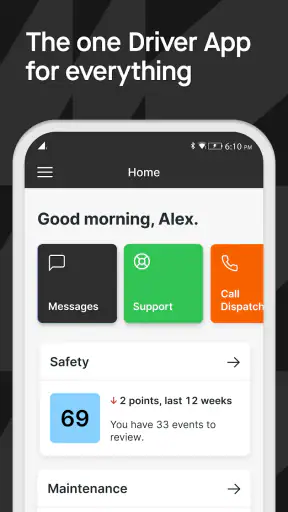
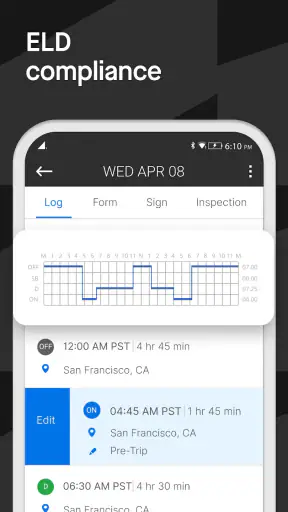
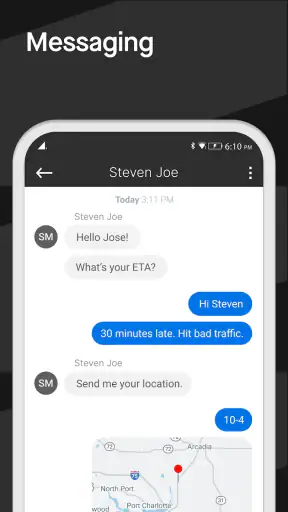
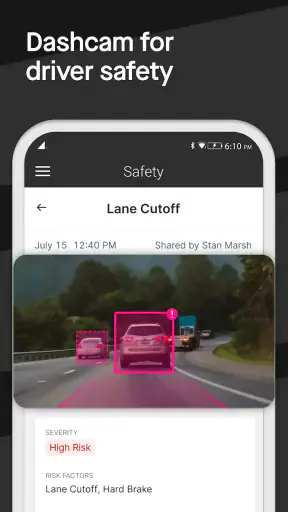
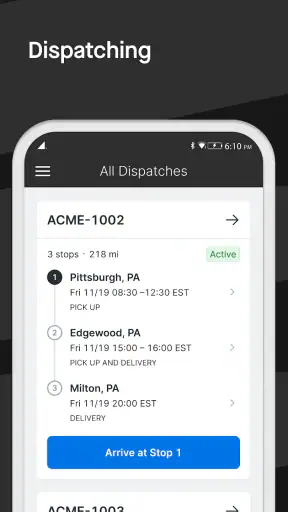
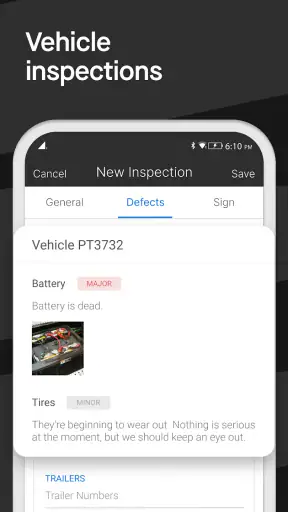
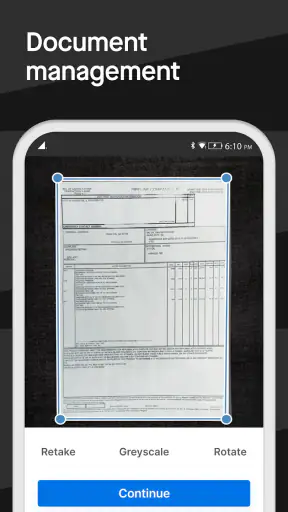
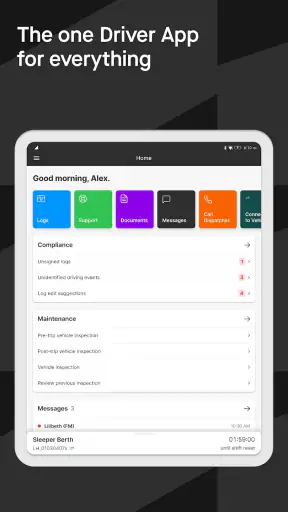
Choosing a driver app is less about finding the longest feature list and more about deciding which daily tasks you want to bring together. Motive Driver is built for commercial drivers who need to handle electronic logging, safety-related recording, and vehicle inspections from one mobile workspace. I found its strongest appeal in that combination: instead of treating compliance, pre-trip checks, and incident documentation as separate chores, it puts them under the same driver-focused workflow.
That makes it a very different proposition from a simple navigation app, a mileage tracker, or a paper inspection checklist moved onto a phone. It is a business app from Motive Technologies Inc., and it is available free of charge with an Everyone content rating. The app has passed the point where I would call it experimental: it has more than a million installs, an average rating of 4.5 from roughly thirty-five thousand ratings, and around fourteen thousand written reviews.
My recommendation depends on your role. If you drive under an operation that already uses Motive’s platform, this is the kind of app that can become part of your normal start-of-shift and end-of-shift routine. If you are an occasional driver, a private vehicle owner, or someone looking only for directions, it is probably more structured than you need. The important question is not whether it can do several jobs, but whether those jobs match the way you already work.
What I would check before choosing a driver app
The first decision point is compliance. A driver who must maintain accurate duty records needs an app that supports a disciplined process rather than relying on memory at the end of the day. Motive Driver is aimed at that situation, with electronic logging at its center. I would judge it by how easily I can keep the current status correct while driving, stopping, loading, waiting, and finishing a shift.
The second point is inspection workflow. A useful inspection tool should make it natural to complete checks before movement, record problems clearly, and avoid turning a routine check into a confusing form. The value here is not just replacing paper. It is having inspection information captured in the same driver environment as the rest of the work, so I am less likely to forget where I recorded an issue.
The third consideration is evidence. The safety dashcam function gives the app a role beyond logging hours. When an incident or disputed event occurs, having a safety-oriented recording process can be more useful than relying on a separate camera with a separate storage routine. I would still think carefully about how the camera is mounted, powered, and managed in the vehicle, but the integrated approach is appealing for fleets trying to reduce disconnected tools.
Finally, I would consider who controls the setup. This is not an app I would choose purely because it is free to download. Its usefulness depends on the surrounding operation: the carrier’s procedures, the vehicle setup, and the way drivers are expected to complete their records. A solo operator may appreciate the unified workflow, while a company with an established system may need to confirm that Motive fits its existing process before asking every driver to switch.
The daily workflow feels more coherent than a collection of separate tools
In a realistic morning scenario, I would open the app before moving the vehicle, complete the required inspection, review my current duty status, and make sure the safety recording setup is ready. That sequence matters because it puts the administrative work before the road work. I would rather spend a short, deliberate moment preparing than discover later that an inspection was skipped or a status was left unchanged.
During the shift, the app’s advantage is continuity. An electronic log is not useful if it is treated as a form completed only after the fact. The better habit is to update it as the day changes. Motive Driver is designed around that driver-facing responsibility, so I see it as most valuable for people who are willing to make small, timely updates instead of trying to reconstruct an entire day from memory.
The inspection side also has a practical benefit: it encourages a repeatable routine. Drivers often know what they should check, but busy yards, changing trailers, and tight departure times can make consistency difficult. A guided mobile process can serve as a prompt. My tip would be to use the same order every day and treat unusual findings as items to resolve immediately, not notes to decipher hours later.
The safety dashcam element changes the app from a compliance utility into a broader operational tool. I would not regard it as a substitute for careful driving or proper incident procedures, but it can support a clearer record of what happened on the road. The trade-off is that any camera-based workflow needs attention to placement and readiness. If the phone or camera is poorly positioned, the feature’s theoretical value will not translate into useful evidence.
Useful details that are easy to overlook
One non-obvious strength is the way the app can reduce the number of places where a driver has to remember information. Separate tools often create separate habits: one for logs, one for inspections, and another for video. Combining them does not remove the need for accuracy, but it makes the start-of-shift checklist easier to remember. I would use that shared workflow as a behavioral advantage, not merely as a convenience.
A second insight is that the app is likely to be most effective when used proactively. If I wait until the end of a shift to correct statuses or enter inspection details, I lose the benefit of having a driver-centered system. The practical tip is simple: make the app part of the departure ritual, then make brief checks part of every meaningful change in the day. That approach is more reliable than treating it like paperwork.
A third trade-off concerns incident review. A recording feature can be valuable only when the surrounding routine is dependable. Before relying on it, I would verify that the device is positioned safely, that the driver can operate the vehicle without distraction, and that the company’s process for reviewing footage is understood. The app may bring the pieces together, but good results still depend on how the fleet uses them.
There is also a useful distinction between a driver app and a fleet-management dashboard. Motive Driver is presented as the driver-facing part of the experience. That means I would expect its best value while I am in or around the vehicle, completing tasks and maintaining records. A manager looking for broad dispatch, maintenance, payroll, or reporting controls may need a different interface or a larger operational system rather than judging this app alone.
Where it wins, and where another approach may fit better
Motive Driver wins when the goal is consolidation. A driver who currently carries a paper inspection sheet, uses a separate logging tool, and operates a standalone dashcam may find the unified concept easier to maintain. The benefit is not just fewer icons on the phone. It is a clearer connection between the actions that happen before departure, the records maintained during the trip, and the safety context around the drive.
It also has a strong case for fleets that want a consistent driver routine. A common app can make training easier because the same basic environment is used across vehicles and shifts. That does not guarantee perfect compliance—people still have to use it correctly—but it gives an operation a single place to teach instead of several unrelated procedures.
Compared with a paper checklist, the app is more convenient for a driver who wants inspection work kept digitally. Compared with a basic logbook app, it offers a broader safety and inspection focus. Compared with a standalone dashcam, it promises a more connected workflow. I am deliberately describing those differences by category rather than assigning features to unnamed competitors, because the right alternative depends on the carrier’s current tools and obligations.
There are clear situations where I would choose something else. If all I need is personal trip tracking or navigation, a business-oriented driver platform would add unnecessary structure. If my company already has a reliable electronic logging and inspection system, switching only for a different mobile interface may create more disruption than value. And if my work does not involve regulated commercial driving, the compliance emphasis may feel like overhead rather than help.
Another possible limitation is the learning curve created by doing several jobs in one app. Consolidation is helpful once the routine is familiar, but a new driver may need time to understand which action belongs to which part of the workflow. I would not judge the app after a single hurried use. I would test it across a complete workday, including departure, stops, status changes, inspection findings, and sign-off habits.
The free price is attractive, especially for someone evaluating the driver experience, but “free” does not mean switching is costless. The real cost may be training, changing established procedures, preparing vehicles, and helping drivers build new habits. A fleet should measure that transition in time and consistency, not only in download expense.
What switching would actually involve
If I were moving from paper or another app, I would begin with a small pilot rather than changing every driver at once. I would choose a few normal routes and observe where people hesitate: starting the inspection, changing status, handling an unexpected defect, or reviewing the safety setup. Those friction points are more informative than a quick installation test.
I would also write down the exact beginning and ending routines before asking drivers to switch. For example, the team should agree on when the inspection is completed, when the log is checked, and what happens when a problem is found. Without that shared procedure, drivers may all use the same app differently, which defeats much of the consistency advantage.
For an individual driver, the transition is simpler but still deserves care. I would learn the app while parked, not while moving, and I would run through a complete inspection before depending on it during a demanding shift. I would also keep the company’s required process in mind: an app can support the workflow, but it does not replace the driver’s responsibility to follow instructions and keep records accurate.
The current version is 107.2, and the app requires at least iOS 9. That makes device compatibility a practical checkpoint before deployment. A fleet should check the phones already assigned to drivers, especially if some vehicles use older devices. Compatibility is not an exciting part of the decision, but discovering a problem after rollout is far more expensive than checking first.
Because the app is rated for Everyone, its store classification does not create an age barrier for ordinary users. That does not make it a children’s app or a general-purpose tool; its design and purpose remain firmly tied to commercial driving and business operations. I would evaluate it based on the driver’s work, vehicle setup, and company process rather than the broad content label.
Who should use it and who should skip it
I would recommend Motive Driver to a commercial driver who wants one mobile place for electronic logs, inspections, and safety dashcam duties, particularly when the employer or carrier is already organized around Motive. It is also worth considering for a small operation that is tired of maintaining several disconnected driver tools and is prepared to standardize its routines.
I would be more cautious for a solo driver who wants complete freedom to choose separate tools. The integrated approach can be a strength, but it may feel restrictive if you already have a trusted inspection method and camera setup. I would also skip it for ordinary personal driving, delivery work that does not require this kind of recordkeeping, or anyone searching mainly for maps and traffic.
One question many drivers will have is whether installing the app alone solves compliance. In my view, no app can do that by itself. The driver still needs accurate entries, timely updates, sensible inspection habits, and a clear understanding of the carrier’s procedures. Motive Driver can organize those actions, but it cannot compensate for careless use or an unsuitable vehicle setup.
Another practical question is whether the app replaces every other fleet tool. I would not assume that. Its strength is the driver-facing combination of logging, inspections, and safety recording. Broader business needs may still require other systems or processes. The right way to assess it is to identify the exact tasks your current tools handle, then see whether this app improves the driver portion without creating gaps elsewhere.
Users may also wonder whether the free download means there is nothing to plan. I would treat the download price as an easy entry point, not as the entire ownership decision. Training, phone readiness, mounting, charging, and operational consistency all affect the result. A short trial with real drivers is a better test than relying on the store page or a single demonstration.
My recommendation after looking at the complete workflow
I see Motive Driver as a focused business app that makes the most sense when compliance and safety tasks are part of the same working day. Its best quality is not one isolated feature; it is the attempt to connect the electronic log, inspection routine, and safety dashcam into a driver-centered habit. That can remove friction for people who currently jump between paper, separate apps, and disconnected vehicle equipment.
Its limitations are equally important. It is not a universal driving companion, and its value depends on proper setup and disciplined use. A driver who dislikes structured routines may find the app demanding, while a fleet with an entrenched alternative may face more switching effort than benefit. I would also avoid choosing it solely because it is free or popular; the workflow has to fit the actual operation.
Still, for the right audience, I would recommend giving it a careful trial. Start with a complete parked walkthrough, use it through a normal shift, and pay attention to the moments where records or inspections are easiest to miss. If the combined process feels clearer than your current method, Motive Driver is a sensible candidate for regular use. If your needs are limited to navigation, personal mileage, or a simple standalone camera, a lighter alternative will probably serve you better.
My final view is straightforward: choose Motive Driver when one consistent driver workflow matters more than having separate best-of-breed tools. For commercial drivers and fleets that need electronic logging, inspections, and safety recording close together, it offers a practical direction and a free way to begin evaluating that approach. I would recommend it to that audience, provided the team plans the transition instead of treating installation as the whole solution.


